



Customers rarely make decisions on their own. They read online reviews, compare experiences and look at what your current customers say before deciding whether to choose your business or go to a competitor.
Customer reviews don’t just help potential customers — they also help search engines. Reviews improve your local search engine optimization (SEO) rankings, which is why your Google Business Profile (GBP) is such an important tool.
Your GBP plays a big role in helping new customers find you. If a competitor with similar products or services ranks higher locally, it’s often because they have more reviews — and better ones.
Reviews are more than just star ratings. They show Google that your business is trustworthy, active and relevant. When you increase both the number and quality of your reviews, you build customer trust and boost your visibility in local search results.
In this guide, we’ll explain why reviews matter for Search Engine Optimization and share helpful review management tips so you can improve both your review profile and your local SEO performance.
Why Google Cares About Reviews for Local SEO Rankings
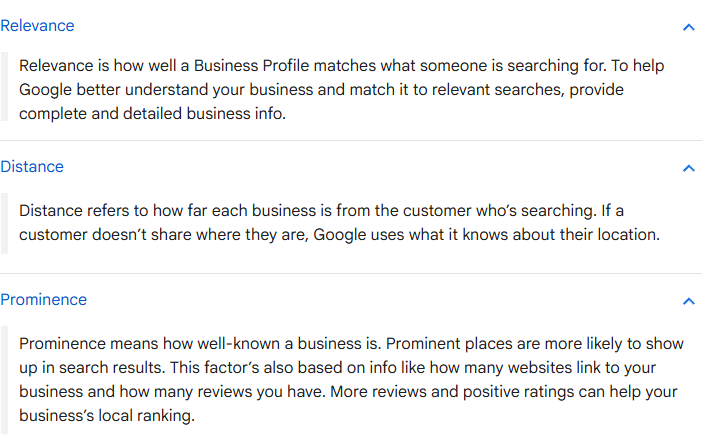
Google’s local ranking algorithm focuses on three main factors: relevance, distance and prominence.
- Relevance
- Distance
- Prominence
Reviews help local businesses improve prominence. This is important because review snippets (called “review justifications”) can appear directly in search results. These snippets add trust and help potential customers feel more confident when they’re searching for a specific service.
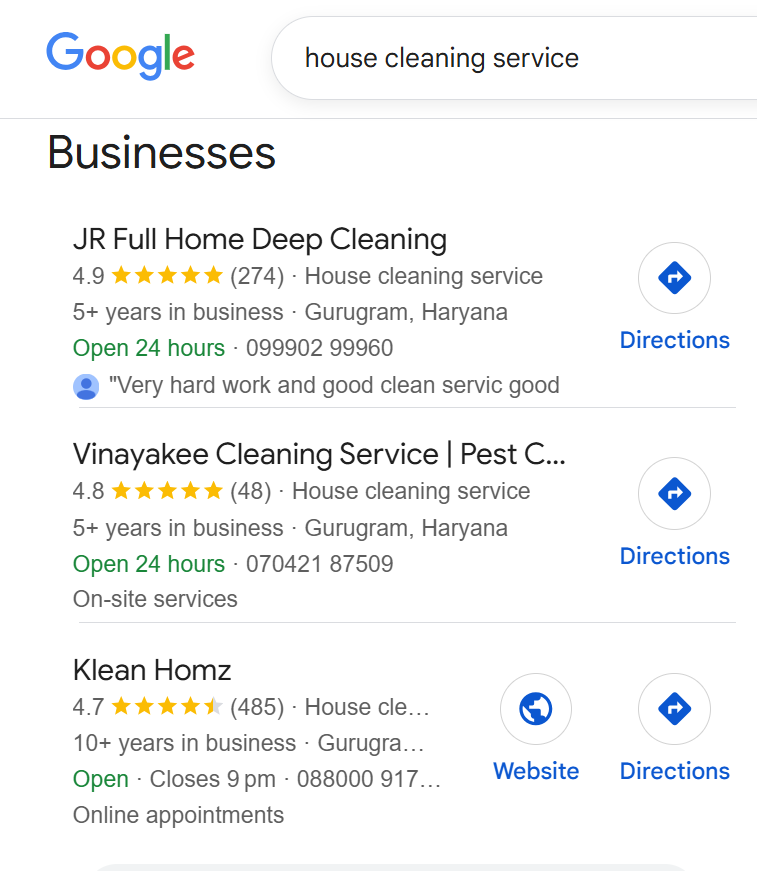
But Google doesn’t just look at how many reviews you have. According to Google, it also pays attention to:
- How often you get new reviews
- Your average star rating
- The actual comments and details people include in their reviews
“Google uses Google reviews and other review sites to help determine rankings on Google Maps. This matters more for local and mobile searches than for national or desktop searches,” said Tim Clarke, Senior Reputation Manager at Digital Marketing Agency.
“Other review sites like Facebook, Yelp and BBB also rank well and show star ratings in search results, so reviews across all platforms can strongly influence visibility.”
How To Encourage Customer Reviews That Improve Local SEO Rankings
A good review strategy should feel easy and comfortable for both you and your customers.
Managing reviews for Google SEO means keeping track of what people say, replying to their feedback and using it to improve your business. Getting reviews shouldn’t feel difficult — most happy customers are willing to share their experience if you ask them the right way.
1. Ask at the right time:
Reach out right after a successful service, delivery or purchase — this is when the customer is happiest.
2. Make it easy:
Share a direct link to your Google Business Profile (GBP) review page through email or SMS. You can also use a QR code.
How to create and share your link or QR code:
- Open your Business Profile
- Go to Read Reviews → Get more reviews
- Share the link or QR code using the options provided
- To copy the review link: click Copy
- To download the QR code:
-
Right-click the QR code
-
Select Save image as…
-
3. Personalize your message:
Use the customer’s name and mention the specific service or product they received.
4. Explain why reviews matter:
Let them know their review helps others choose a good local service.
According to Clarke, one of the best ways to get reviews without making customers uncomfortable is to “use the QR code in person if you know the customer well or have a good relationship.”
He adds, “Email and SMS requests are also gentle and don’t bother most customers since they can unsubscribe or ignore the message if they prefer.”
Tips for Responding to Reviews the Right Way
Reviews work both ways. Whether a review is positive or negative, how you respond shows customers that you care about their experience.
Here Are Some Dos and Don’ts
Do:
- Reply to all reviews — good or bad.
- Thank the customer honestly.
- Mention specific details they talked about.
- Handle problems with understanding and offer a clear solution.
Don’t:
- Don’t use the same response for everyone.
- Don’t get defensive or argue in your reply.
- Don’t use templates without personalizing the message.
Example Responses
Positive Review Response:
“Thank you so much, Jenna! We’re really happy to hear you loved our carpet cleaning service. Our team works hard to deliver great results, and your message made their day!”
Negative Review Response:
“Hi Daniel, we’re very sorry that your experience wasn’t what you expected. This is not the level of service we aim to provide. We’d like to talk with you and fix the issue. Please contact us at info@siddhant-kumarq3edge-com.”
These responses are polite and professional — and they also help build trust and increase engagement. If a review breaks Google’s posting rules, you can ask Google to remove it.
Even very negative reviews can be handled calmly. You can turn them into opportunities by “reducing the tension and replying with a polite, factual message,” Clarke said.
“Don’t argue or be rude. Try to move the conversation offline by sharing your company’s email or phone number. Explain the situation clearly, but don’t sound defensive, unprofessional or upset — because everyone can see your reply.”
Showcasing Reviews To Build Trust and Boost SEO
Once you have customer reviews, make sure you use them to your advantage.
Ways To Highlight Your Customer Reviews
- On your website: Create a testimonials page or add review sections to popular pages — this can help improve your local search rankings.
- On your Google Business Profile (GBP): Pin your best review or add photos that show happy customers or their feedback.
- In your local listings: Make sure review snippets appear on sites like Yelp, Facebook and Apple Maps.
- On social media: Turn positive reviews into posts or Stories — they help build trust and can improve your local SEO.
Tip: Add schema markup (review structured data) so Google can show star ratings in search results.
When people see honest feedback from real customers, they’re more likely to trust your business and take action.
Keep the Momentum Going
Reviews aren’t something you do once and forget — they are a long-term part of managing your online reputation.
How To Keep Your Review Strategy Strong
- Check new reviews every week.
- Share them with your team so everyone knows what customers like.
- Use negative reviews to fix problems and improve service.
- Set goals every quarter for how many reviews you want and what average rating you aim for.
Also, doing regular SEO audits can help you find gaps in your local visibility — such as weak keywords or missing review signals — and make sure your strategy stays aligned with Google’s changing ranking factors.
When you manage reviews consistently, they increase your visibility, strengthen your reputation, and ultimately help grow your business.