

)
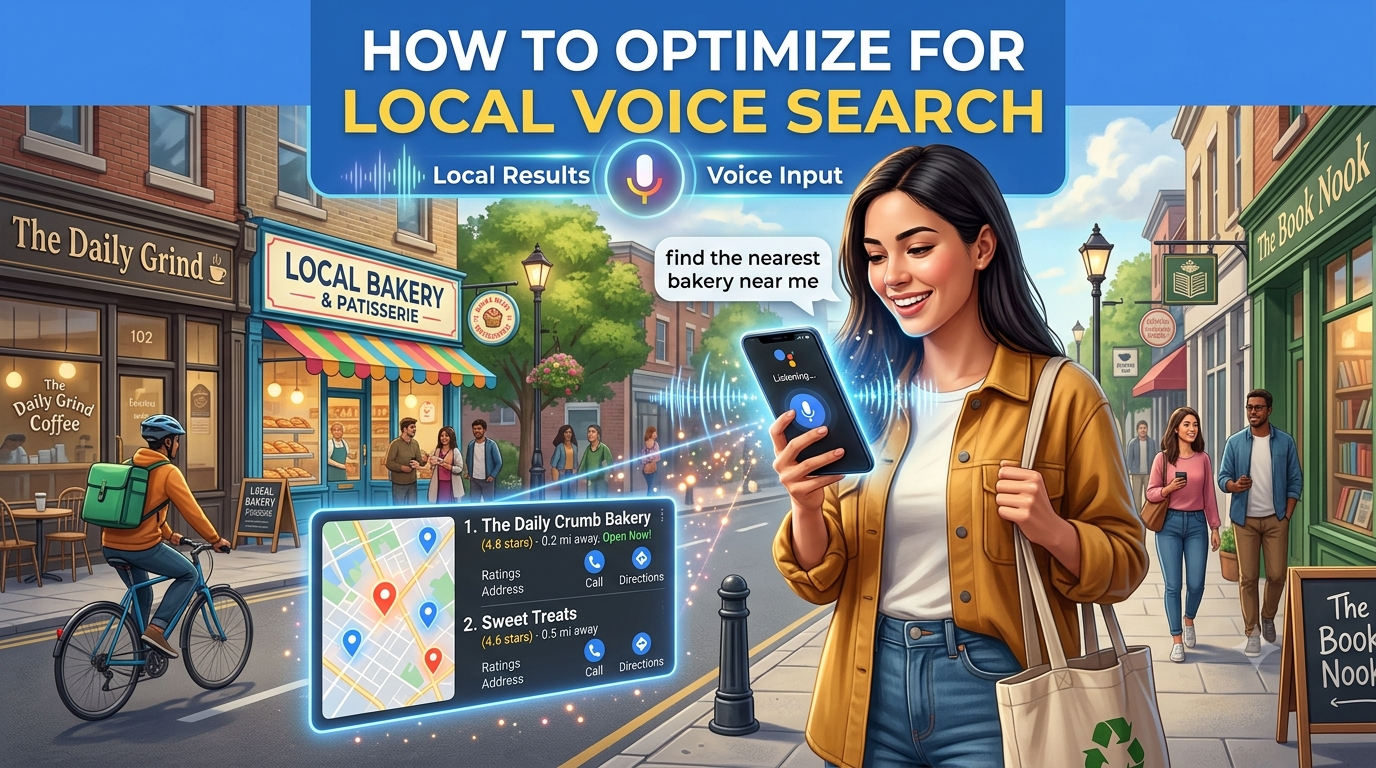
Have you ever tapped your phone screen and asked, “Where is the best coffee shop near me?” or shouted across the kitchen, “Alexa, what time does the local hardware store close?”
If so, you aren’t alone. You are part of a massive, rapidly growing movement of voice-first consumers.
Today, hundreds of millions of people rely daily on Siri, Google Assistant, and Amazon Alexa to navigate their local neighborhoods, discover new businesses, and make quick buying decisions. Voice search has officially shifted from a sci-fi luxury into a fundamental daily habit.
For local business owners, service providers, and marketers, this shift presents a monumental opportunity—or a quiet crisis. When someone asks a voice assistant for a local recommendation, the assistant doesn’t show a list of ten blue links on page one. It usually gives just one single answer.
If your business isn’t optimized for voice search, you are essentially invisible to customers who are actively searching for what you sell right now.
The good news? Optimizing for local voice search doesn’t require a degree in computer science or a massive marketing budget. It simply requires understanding how people talk and making it effortless for AI assistants to read your business details.
Here is your complete, step-by-step guide to mastering local voice search.
1. Why Voice Search Changes the SEO Game
To win at local voice search, you first need to understand how spoken queries differ from traditional typed searches. When people sit down at a desktop computer to type into Google, they use short, fragmented keywords.
- Typed Search: “best bakery Chicago”
- Typed Search: “plumber open now”
People use shorthand because typing takes effort. But when people speak out loud to an assistant, they use full, natural, conversational language.
- Spoken Voice Search: “Hey Google, where can I find the best bakery in Chicago that has gluten-free options?”
- Spoken Voice Search: “Siri, can you find a reliable plumber near me that’s open right now?”
Notice the difference? Voice queries are longer, more conversational, question-based, and heavily focused on immediate, local intent.
Furthermore, voice searches are almost exclusively performed on mobile phones or smart speakers. The user is usually on the move, multitasking, or looking for an immediate solution. If you want voice assistants to choose your business as their top recommendation, your online presence must mirror this natural, immediate style of communication.
2. Master Your Local Listings: The Foundation of Voice Search
Before a voice assistant ever reads text off your website, it checks structured business directories. If an AI assistant cannot verify your business location, phone number, and hours through official channels, it won’t risk recommending you.
Claim and Fully Optimize Your Google Business Profile
Your Google Business Profile (GBP) is the single most critical asset for local voice search, especially for queries powered by Android devices and Google Assistant.
- Verify Your Listing: Ensure you officially own and have verified your GBP listing.
- Ensure Exact NAP Consistency: NAP stands for Name, Address, and Phone Number. Make sure this information is 100% identical across your GBP, your website, your social media profiles, and directories like Yelp or Apple Maps. If your address is “123 Main Street, Suite B”, don’t write “123 Main St., #B” elsewhere. Inconsistencies confuse AI models.
- Fill Out Every Detail: Complete every single section available—your business category, attributes (e.g., “wheelchair accessible,” “free Wi-Fi”), accepted payment methods, and business description.
- Keep Hours Updated meticulously: This is a huge factor. Voice searches like “Is the hardware store open near me?” rely entirely on your listed hours. Update your profile for holidays, seasonal shifts, or special events. If Siri sends a customer to your shop only for them to find a “Closed” sign, you lose trust, reviews, and revenue.
Don’t Ignore Apple Maps and Bing
While Google dominates search traffic, Siri relies heavily on Apple Maps, and Alexa draws heavily from Bing Places and Yelp. To cover all your bases, claim and update your listings across:
- Apple Business Connect
- Bing Places for Business
- Yelp
- TripAdvisor (if applicable to hospitality or tourism)
3. Write How People Actually Speak
Traditional Search Engine Optimization (SEO) often led website owners to write stiff, robot-sounding copy stuffed with keywords. For voice search, that approach fails completely.
Voice assistants prioritize content that sounds natural when read aloud. If your website text reads like a rigid sales brochure, it won’t align with the conversational phrasing of voice queries.
How to Adopt a Conversational Tone:
- Use First- and Second-Person Pronouns: Use “we,” “you,” and “I.” Speak directly to the reader as if you were standing face-to-face with them in your store.
- Avoid Overly Formal Jargon: Replace complex industry buzzwords with everyday language. Instead of saying “We offer premier automotive climate-control remediation,” say “We fix car air conditioning fast.”
- Read Your Content Out Loud: When writing web pages, read your paragraphs aloud. If you stumble over a sentence or feel out of breath, rewrite it. If it sounds unnatural to your ears, it will sound awkward coming out of a smart speaker.
4. Build a High-Value FAQ Strategy
Voice searches almost always begin with intent-driven question words: Who, What, Where, When, Why, and How.
Because of this, a well-structured Frequently Asked Questions (FAQ) page is one of the most powerful voice search tools you can build. It allows you to directly target exact spoken phrases.
How to Build a Voice-First FAQ Page:
- Identify Real Customer Questions: Listen to what customers ask you on the phone, in emails, or in person. What are their most common immediate concerns?
- Format Questions Exactly as Spoken: Use full sentence headers for your questions.
- Good: “What time do you serve breakfast until?”
- Bad: “Breakfast Hours”
- Provide Direct, Concise Answers: Place a direct, 30-to-50-word answer directly below the question header. Voice assistants love concise, punchy answers that can be read aloud in 5–10 seconds.
- Elaborate Afterward: After giving the direct answer, you can provide additional details, links, or context for visitors reading on a screen.
Example FAQ Block for Local Voice Search:
Q: Where can I park when visiting your downtown restaurant?
A: We offer free customer parking in the lot behind our building off 4th Avenue. Additional metered street parking is available directly in front of our entrance on Main Street.
5. Target “Near Me” and Hyper-Local Context
When people use voice search while driving or walking, they frequently use phrases like “near me,” “close by,” or “in [Neighborhood Name].”
However, you shouldn’t just write “near me” repeatedly on your website. Search engines are smart enough to determine user location automatically; what they need from your website is hyper-local context to prove you are genuinely rooted in that area.
Strategies to Inject Local Context into Your Website:
- Mention Local Landmarks and Cross-Streets: Don’t just list your address. Include natural geographic directions like “Located just two blocks west of Central Park, right across from the historic Paramount Theater.”
- Highlight Neighborhood Names: If your city has distinct districts (e.g., “The Arts District,” “Downtown,” “West End”), mention these prominently in your copy.
- Create Local Neighborhood Landing Pages: If your business serves multiple surrounding towns or suburbs, create dedicated, unique web pages for each area (e.g., “Plumbing Services in Oak Park” and “Plumbing Services in Evanston”).
- Sponsor Local Events or Charities: Blogging about local events, community sponsorships, or neighborhood news reinforces your geographical relevance to search engine crawlers.
6. Technical Foundations: Mobile Speed and Schema Markup
Even if your copy is brilliant, technical hurdles can prevent voice assistants from reading your site. Voice assistants prioritize speed and clear data structure.
1. Lightning-Fast Mobile Performance
The vast majority of voice searches take place on mobile devices connected to cellular networks. If your website takes four or five seconds to load, search engine algorithms will bypass your site entirely and move to a faster competitor.
- Compress Images: Ensure all images are saved in modern formats (like WebP) and compressed to keep file sizes small.
- Minimize Scripts: Reduce heavy pop-ups, slow plugins, and unnecessary code.
- Aim for a 2-Second Load Time: Test your site on Google PageSpeed Insights and ensure your mobile score is in the green zone.
2. Implement Local Business Schema Markup
Schema markup is a form of microdata you add to your website’s backend code. It acts like a cheat sheet for search engine robots, telling them precisely what your data means.
By adding LocalBusiness Schema to your site, you explicitly tell Google:
- This is our official name.
- This is our street address.
- These are our latitude and longitude coordinates.
- These are our precise operating hours.
- These are our customer review scores.
When search engines don’t have to guess what your website content means, they are far more likely to serve your business as an authoritative voice search result. You can easily generate schema code using free online generators or WordPress plugins.
7. The Power of Reviews and Social Proof
Voice assistants exist to give users the best answer, not just any answer. When someone asks Siri or Google for a recommendation, the algorithm factors in overall reputation and customer feedback.
A business with a 4.8-star rating and 200 reviews will almost always be selected over a business with a 3.5-star rating and 5 reviews.
How to Build Voice-Friendly Review Velocity:
- Ask Consistently: Make asking for reviews a standard part of your post-sale process. Send a follow-up email or SMS with a direct link to your Google Business Profile.
- Respond to All Reviews: Take the time to thank customers for positive reviews and politely resolve negative ones. Search engine algorithms track owner response rates as an indicator of an active, trustworthy business.
- Encourage Keywords in Reviews: When customers leave detailed reviews mentioning specific services or neighborhood names (e.g., “Best latte in downtown Austin!”), it further boosts your local voice search authority.
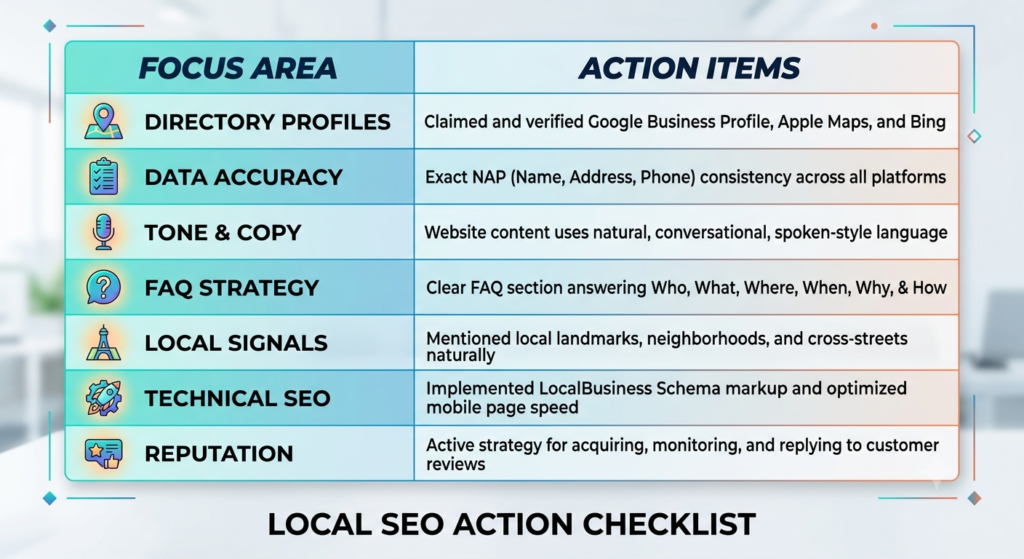
Your Voice Search Optimization Checklist
To ensure your local business is fully prepared to capture voice search traffic, run through this quick checklist:
Final Thoughts: Speak Up for Your Business
Local voice search isn’t a distant trend set to arrive years down the road—it is already here, shaping how local commerce happens every single minute of the day.
By making a few intuitive adjustments—cleaning up your local business profiles, writing conversational copy, answering common questions clearly, and ensuring your site loads fast on mobile screens—you can position your business right at the top of spoken search results.
Don’t let your competitors get the last word. Start optimizing today for voice search, and make sure that the next time a local customer asks their phone for a recommendation, your business is the answer they hear!